Attach file (WA)
Please note:
These instructions apply to WA only.
This feature enables you to add files to your forms, allowing you to send or print a form with the selected attachments appearing as a single PDF.
Various types of files can be attached to your forms for record keeping purposes, however only PDFs can be appended to the form when printed/emailed.
Open the form you want to attach a file to.
Click
Filesin the form’s sidebar.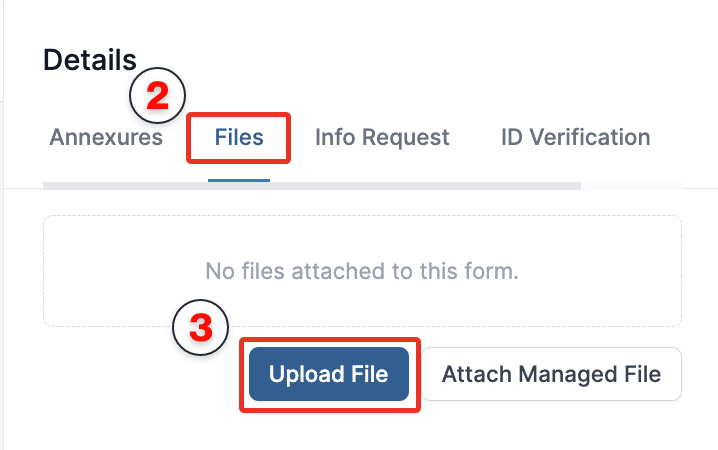
Click
Upload File.Select the file you want to upload, or drag and drop it into the upload area.
Select or clear the following options as required:
- Convert image to PDF: Converts an uploaded image into a printable PDF.
- Print with the form: Includes the PDF when printing the form. This setting can be changed later.
- Convert PDF form fields: Converts existing fillable fields in the PDF into custom fields on the form.
Click
Uploadto attach the file.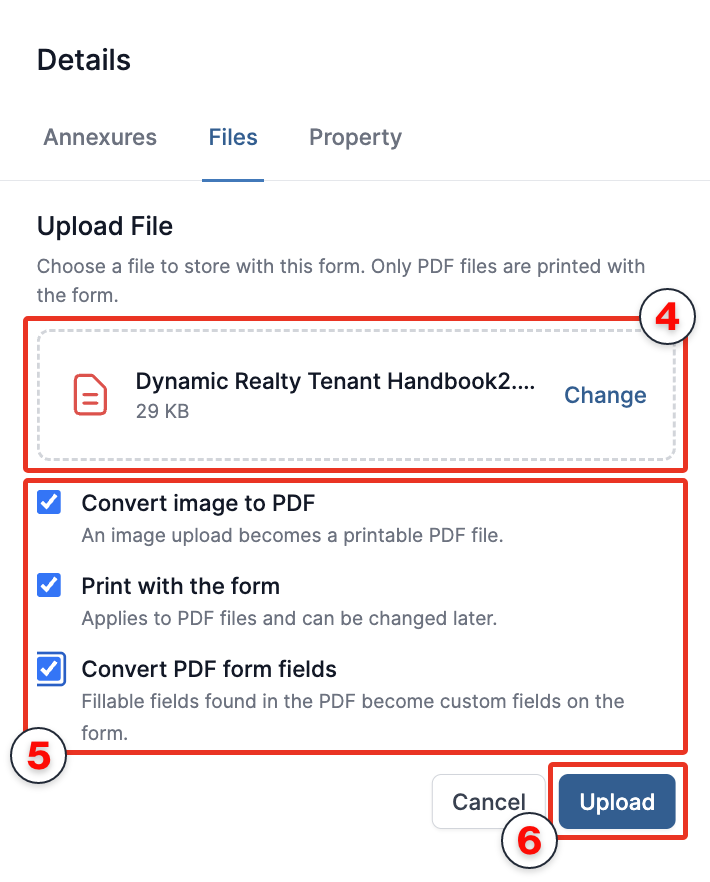
Click
Close.
To add or edit fields on the attached PDF, follow the PDF Completion instructions.
Already have a managed file? Click Attach Managed File instead of Upload File, then select the managed file you want to attach.